Why I Built StackWM
For fifty years, window managers have put the same question to you: where does this go? StackWM asks a different one.
Imagine you sit down to write a report. An hour later, you realize you've spent thirty minutes choosing fonts and adjusting margins. The document isn't any better. You're just tired.
Window management is the same: most of the time you spend on it, you're not doing your actual work — you're arranging the tools you need to do your actual work.
TL;DR
- The problem: Most window managers ask "where does this window go?" — requiring you to decide, every time, for every window. This is mental overhead that accumulates daily.
- The insight: A physical desk naturally organizes itself into a focus area and peripheral piles. This model emerged because it works — no design, no maintenance.
- The solution: StackWM applies the desk metaphor to macOS. Zones are your desk regions, Stacks are your piles, Scenes are different desks for different tasks. One keystroke restores everything.
A Light Goes On
One afternoon I caught myself doing it again — nudging a window a few pixels, resizing a panel for the third time that day. I put my hands down and looked at the desk in front of me.
If I put the computer away and just worked directly on this desk, what would it look like?
The Desk Already Has a Model
Look at any workspace that gets real use:
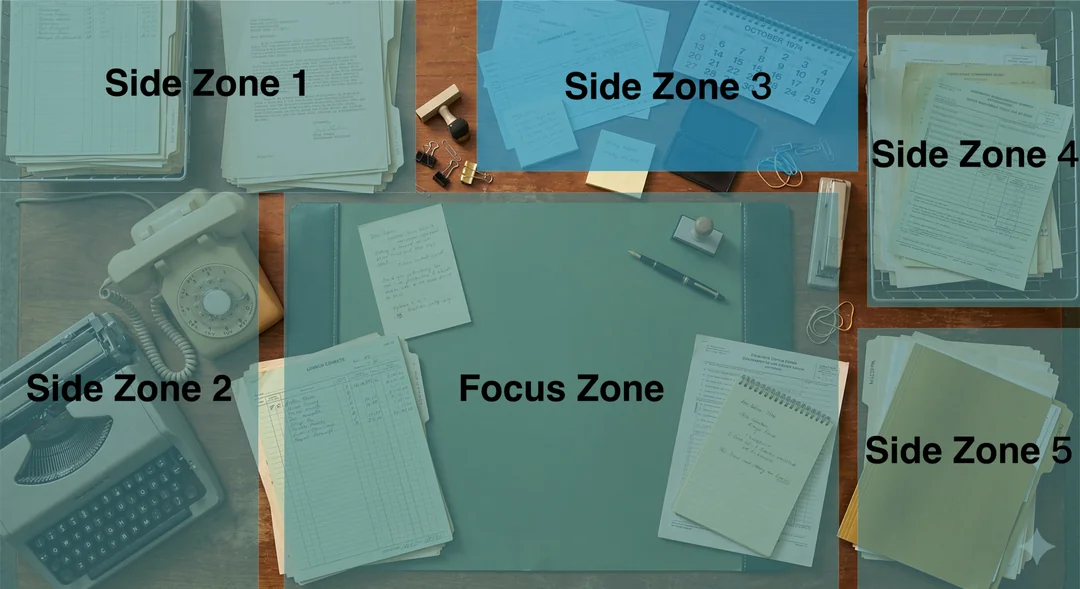
There's a clear center — a desk pad, a clean surface — reserved for the one thing happening right now. Call it the Focus Zone.
Around it are piles. Books, printouts, notebooks. They're not organized in any formal sense. Some overlap. But they stay on the periphery, always within reach, never stealing the center. Call them the Side Zones.
Nobody designed this. It emerged because it works: focus in the center, context within reach, and the whole arrangement requires no ongoing maintenance. You don't think about the piles until you need one.
The Same Model, on Screen
StackWM is that desk, translated to pixels.
Zones are the regions — a center zone for your active task, side zones for references, terminals, tools. You define them once. After that, you don't touch them.
Stacks are the piles. Multiple windows can share a zone, layered on top of each other. You cycle through them with a keystroke, the way you flip through papers without moving the stack off the desk.
Scenes are different desks entirely. "Coding" is one desk — editor centered, documentation on the side. "Writing" is another. You switch between them instantly. The windows are already positioned. There's nothing to arrange.
The goal isn't to give you more control over window placement. It's to make window placement something you stop having to think about.
Attention-Oriented Window Management
From Xerox PARC's floating windows in the 1970s to macOS's virtual desktops to Linux's tiling managers, fifty years of window management have kept the same underlying question: where does this window go? The answer has always been: you decide.
StackWM shifts the question. Instead of asking where windows go, it asks where your attention is:
- Focus Zone — where your attention is right now
- Side Zones — context that stays within reach without claiming the center
- Stack — windows sharing a zone, ordered by recency, cycling on demand
The desk in the photograph above wasn't designed. Nobody optimized its layout. It converged on this arrangement because it matches how human attention actually works: one thing at the center, everything else accessible, nothing demanding maintenance.
StackWM inherits the window from Xerox PARC. It inherits the stack from every real desk that's ever existed. What it doesn't inherit is the assumption that you should be the one managing both.
FAQ
Q: Is StackWM just another window manager?
No. StackWM is a workspace memory system built on a desk metaphor. Traditional window managers optimize placement — snapping tools move the current window to a preset location, tiling managers arrange all windows into grids. StackWM optimizes for context recall: the ability to return to a multi-window working setup with one keystroke. The difference is that you stop thinking about window placement entirely once your zones, stacks, and scenes are set up.
Q: What makes the desk metaphor different from tiling or snapping?
Tiling managers treat your screen as a grid — every window gets equal space in a layout tree. Snapping tools treat windows individually — one shortcut, one placement. The desk metaphor treats your screen as a physical workspace: a focus area at the center (Focus Zone), reference materials on the periphery (Side Zones), and piles of related items within easy reach (Stacks). This maps to how human attention actually works — one thing at center, everything else accessible, nothing demanding maintenance.
Q: Who should use StackWM over a tiling window manager?
You should try StackWM if: (a) you work on an ultrawide or multi-display setup, (b) you have recurring work contexts (coding, writing, meetings) that require the same apps in the same positions, (c) you find tiling grids too rigid or too equal-space for your workflow, and (d) you want to spend less time arranging windows, not more time configuring window rules.
Q: Is StackWM harder to learn than Rectangle or Magnet?
There is a higher upfront learning curve because StackWM introduces zones, stacks, and scenes — concepts that simpler snapping tools do not have. However, that setup cost is one-time. After your zones and scenes match your routine, the daily tax of window arrangement drops to near zero. With snapping tools, you make a placement decision every time you open or move a window. StackWM removes that decision from your day.
Author: StackWM Team. Building macOS workspace tools since 2025. Try StackWM free: https://www.stackwm.org/download